PHONE DROPBY CREATORS PACKS
Send videos and photos from your phone straight into Premiere Pro, After Effects or DaVinci Resolve, over your own Wi-Fi. Install it in a couple of minutes. Nothing to install on the phone.
1. INSTALL ON MAC
Save your work
If Premiere Pro, After Effects or Resolve is open, the installer offers to close it. Save your project first.
Open the installer
Double-click Phone-Drop-Installer.pkg in the Mac folder of your download.
Mac says "Apple could not verify" it? Click Done, then open and click Open Anyway next to Phone Drop.Click through the installer
Continue ▸ Agree ▸ Install, then enter your Mac password or use Touch ID.
Allow it in the background if asked
If a Login Items window opens, allow Phone Drop in the background.
1. INSTALL ON WINDOWS
Save your work
Save your project in Premiere Pro, After Effects or Resolve before you start.
Run the setup
Double-click Phone-Drop-Setup-Windows.exe in the Windows folder of your download.
Blue "Windows protected your PC" box? Click More info, then Run anyway.Tick agree, then Install
Allow it through the firewall
If Windows asks about Phone Drop Helper, tick Private (and Public) networks and click Allow. Your phone needs this to connect.
2. OPEN PHONE DROP

Premiere Pro
Open a project, then .

After Effects
Open a project, then .

DaVinci Resolve Studio
Open a project, then .
Free DaVinci Resolve
opens the QR page in your browser. When files arrive, brings them into your Media Pool.
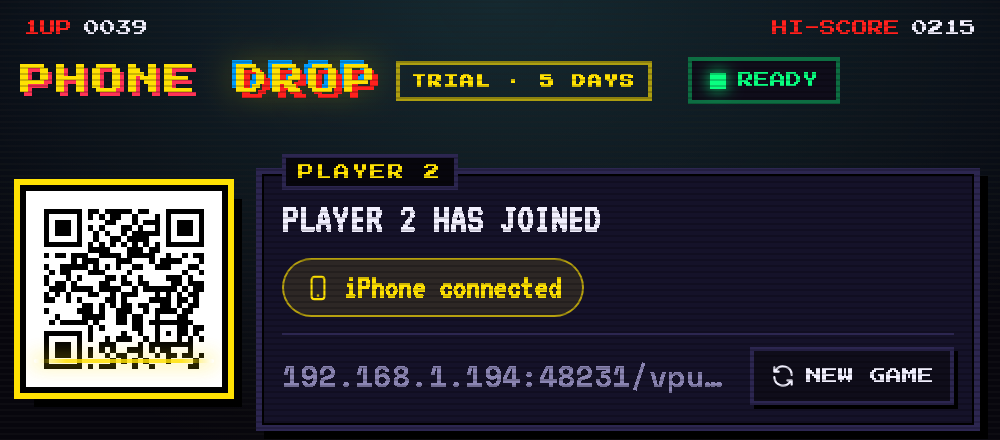
The panel shows a QR code and a READY light.
3. SEND YOUR FIRST FILES
Point your phone camera at the QR code
Tap the link that pops up. The Phone Drop page opens in your phone's browser.
Allow the new phone
The first time, the panel may ask you to allow this phone. Click Allow.
Tap PRESS START
Pick the videos and photos you want. They show under LOOT in the panel and land in the Phone Drop bin.
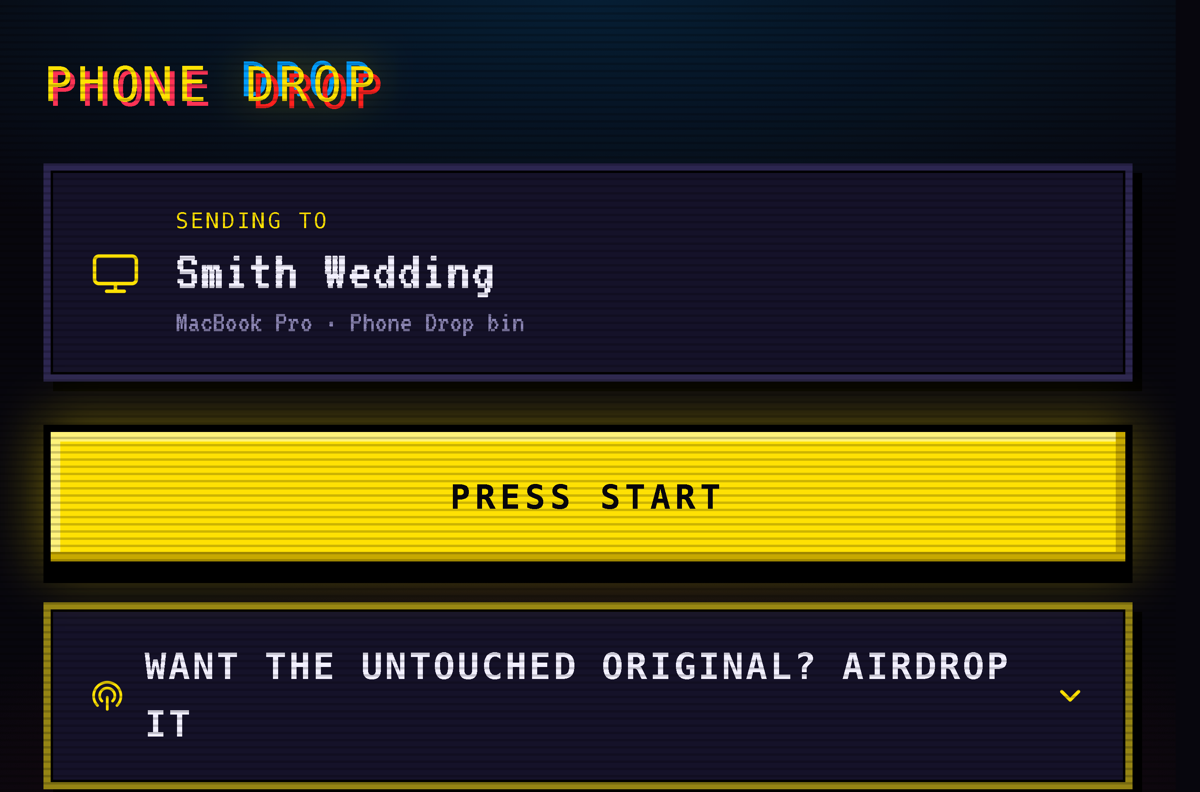
The page on your phone.
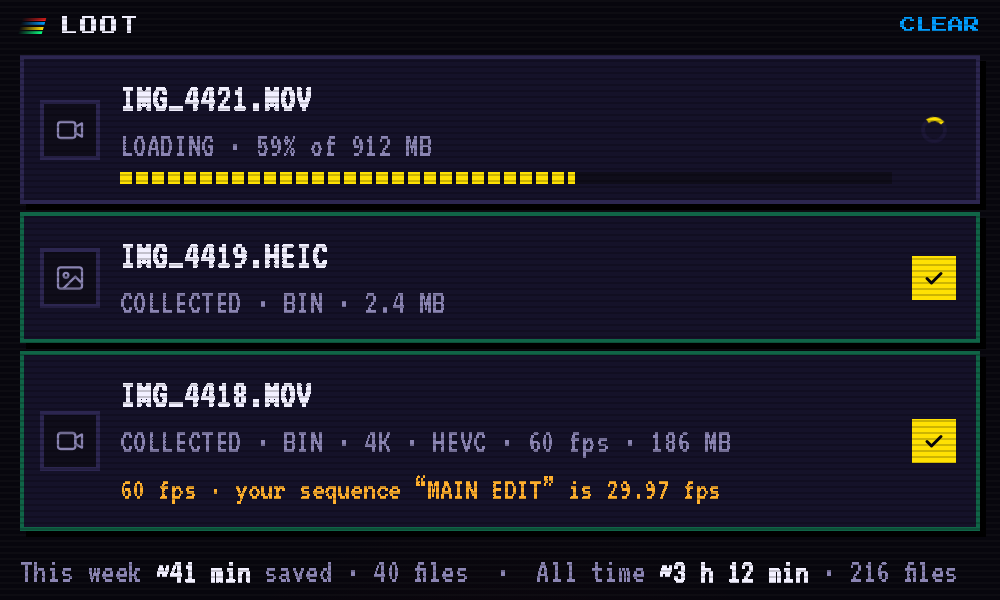
Arrived files under LOOT. If a clip's frame rate doesn't match your sequence, comp or timeline, Phone Drop tells you. Files are never re-encoded.
FULL QUALITY FROM IPHONE
The Photos picker in a web page can send a re-encoded copy, so the frame rate or codec can change. For the untouched original:
On a Mac: AirDrop it
AirDrop the clips to your Mac. Phone Drop imports AirDropped files by itself (AirDrop auto-import in the Auto-import box).
On Windows: Save to Files
In Photos, tap share ▸ Save to Files. Then on the Phone Drop page use Choose File (Files) instead of Photo Library.
Android on Windows
Quick Share auto-import.
FREE TRIAL AND PRO
Every feature is free for 7 days. Then Phone Drop Pro is $19, one time, for 2 computers. No subscription. After the trial Phone Drop locks until you unlock it. Your files and settings stay.
Buy it
At creatorspacks.com/products/phone-drop. Your key arrives by email.
Paste it and press Activate
Paste the key under Account (or on the "Your free trial has ended" screen) and press Activate.
SOMETHING NOT WORKING?
The panel says the helper isn't running
Run the installer again, or restart your computer.
My phone can't connect
Put the phone on the same Wi-Fi as the computer (not a guest network, not cellular). Try New game for a new link. On Windows, allow the firewall prompt.
Phone Drop isn't in the menu
Quit your editing app completely and open it again. Still missing? Run the installer again.
The phone says "Waiting for you to allow this phone"
Click Allow in the panel.
I have several editors open. Where do files go?
Each file goes to whichever editor you were using last: the window in front.
How do I update?
Phone Drop updates itself. When a NEW VERSION bar appears at the top of the panel, click Update now: it downloads and opens the installer. Account shows your version and has Check for updates.
UNINSTALL
Mac: open Uninstall Phone Drop from your Applications folder.
Windows: .
Your files stay where they are, and your licence is kept in case you reinstall.
THE FULL GUIDE
Every feature, the save folders and more, in one PDF.
OPEN THE PDF GUIDEYour files go from your phone to your computer over your own network. They never leave it, and Creators Packs never sees them.
Still stuck? Email support@creatorspacks.com or DM @creatorspacks on Instagram.
Phone Drop by Creators Packs · creatorspacks.com